Quick answer
Attach one PDF, ask for a short summary, then check the important details in the original. Stay in the same conversation to ask about anything unclear.
This guide is for the ChatGPT desktop website and a short PDF with selectable text. It does not cover scanned pages, long research collections or image-heavy reports.
Your route: Choose the file → Upload → Summarize → Ask → Check the original.
Before you start: choose the right PDF
Check the text and remove private information
Open the PDF and try copying a sentence. Selectable text is a useful starting check, not proof of accurate reading.
Have these ready:
- A ChatGPT account with file uploads available.
- One short, non-sensitive PDF.
- The original PDF open beside the conversation for checking.
You do not necessarily need a paid plan. OpenAI supports document uploads on Free and paid accounts, with different limits. If you hit a limit, follow the message shown in your account; do not assume you must upgrade. See the Free Tier FAQ.
Practice file: Download the three-page Fictional Community Workshop Information Pack (PDF). All event details are invented.
Privacy warning: do not upload passwords, identity documents or confidential customer files. Removing names alone does not make a document safe to share. Follow your organization’s rules.
Step 1: Upload your PDF
Check that the right file is attached
Open a new conversation on the ChatGPT website.
- Open the attachment menu and choose the option to upload a file from your computer.
- Check the filename against the document you intended to use.
- Wait for the upload to finish before requesting a summary. Resolve any upload error first.
Our test used the attachment menu’s computer-file upload option. Labels can differ. OpenAI describes the sequence in its upload guide.
What to check: a filename appearing is not proof that every page was understood. The content checks below are still necessary.
Step 2: Ask for a useful summary
Keep dates, numbers, and conditions
With the practice PDF attached, try:
Summarize this workshop PDF for someone deciding whether to attend.
Use five short bullets. Include the date, fee and exclusions,
capacity, registration deadline, confirmation/payment requirements,
and both cancellation rules.
Use only the PDF. Say when information is not provided.
Check the conditions, not just the headline. A summary that says “refunds are available” is less useful than one explaining who cancels and which deadline applies.
In our test, the summary retained the key facts and conditions we checked, but its five bullets were still fairly long. Shorter is not automatically better if a condition disappears.
For wording, tone and length adjustments, see How to Ask ChatGPT Better Questions.
Step 3: Ask about a specific detail
Ask what the PDF does—and does not—say
Continue in the same conversation:
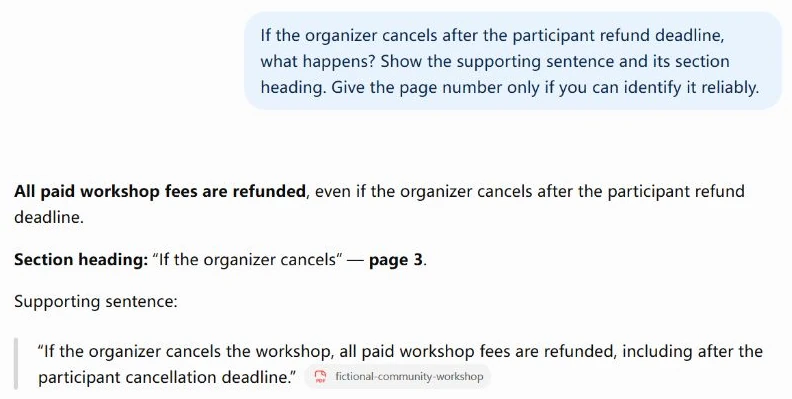
If the organizer cancels after the participant refund deadline, what happens? Show the supporting sentence and its section heading. Give the page number only if you can identify it reliably.
Then test a missing detail:
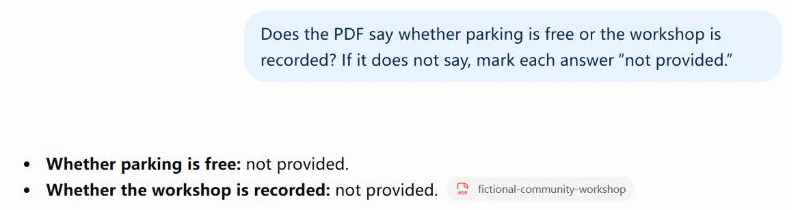
Does the PDF say whether parking is free or the workshop is recorded? If it does not say, mark each answer “not provided.”
The file contains neither detail. Our test answered “not provided” for both. That means the document does not say—not that parking or recording is unavailable.
Step 4: Check the summary against the PDF
Match the detail, quote, and location
Open the original yourself. Do not treat “I checked” from ChatGPT as independent verification.
| Check | Where to look in the practice PDF |
|---|---|
| Date and deadline | Page 1: November 14, 2026 event; November 9 registration deadline at 5 pm. |
| Places | Page 1: 12 places; an application is not confirmation. The organizer must send a confirmation message. |
| Fee and exclusions | Page 2: USD 15; lunch and travel excluded. Payment is requested only after a place is confirmed. |
| Participant refund | Page 2: full refund if cancellation reaches the organizer by November 11, 2026, at 5 pm; later cancellations are not eligible. |
| Organizer cancellation | Page 3: paid workshop fees refunded, even after that deadline. |
Check any quoted sentence word for word. If a page number is wrong or missing, use the section heading and search the PDF for a short phrase. Printed page numbers can differ from a viewer’s page count.
A citation marker is not a guarantee. Checking these facts does not prove that a longer document was read completely.
If something goes wrong
Upload problems
| Problem | What to check next |
|---|---|
| Cannot upload | Check the signed-in account, the file type and the actual error message. |
| Upload limit reached | Follow the reset guidance shown; repeated failed uploads can also count toward limits. |
| Answer describes another document | Check the filename and attached file before continuing. |
Missing text or unreliable references
Keep this exercise text-based. OpenAI currently documents embedded PDF image and chart retrieval for Enterprise. Other plans use text-based retrieval; do not assume an uploaded chart was read. See the PDF visual retrieval FAQ.
If the relevant passage cannot be read or located, stop relying on that answer. Inspect the original; do not ask ChatGPT to fill the gap by guessing.
Finish safely and try it yourself
Review your data controls. Turning off model training does not delete chats. A file saved in Library may remain after its chat is deleted; manage the file separately using the Library guidance. Deletion is not necessarily immediate removal from all systems.
Done means: you have a useful summary, checked its key facts and conditions, and identified what the PDF does not tell you. Try one safe file; verify before using the answer.
Tested October 15, 2026 in one signed-in ChatGPT web session. Other plans and documents were not tested. Official sources checked the same day.